
As an Amazon Associate, I earn from qualifying purchases.
The best OBD2 scanner should answer the question that brought you to the car: why is the check-engine light on, which system has recorded a fault, or can the tool perform a specific maintenance routine? An OBD-II scanner that retrieves engine fault codes is not automatically an airbag diagnostic tool or a brake-service device. Paying for the right access matters more than buying the longest feature list.
I compare six OBD2 scanners for U.S.-market owner and DIY use, from the ANCEL AD310 code reader to the TOPDON ArtiDiag900 Lite tablet. For an initial engine-light investigation, I would start with the AD310. For broader diagnostics without a phone, compare the FOXWELL NT604 Elite with the Innova 5610. For a Bluetooth OBD2 scanner, BlueDriver and OBDLink offer different software approaches; the tablet suits more involved work.
Editorial Note: My recommendations are based on verified manufacturer specifications and independent reviews, not hands-on testing.
Key Takeaways: Choose the Diagnostic Coverage You Need
Match the scanner to the warning. A basic emissions reader can retrieve an engine error code yet leave other vehicle systems out of reach. Reading an ABS or airbag module also does not guarantee access to its service routines. Decide whether you need information, a supported active test, or a maintenance procedure before comparing devices.
Reading, clearing, and bidirectional control are different capabilities. The NT604 Elite illustrates the distinction: four-system coverage does not make it an ABS-bleeding or battery-registration tool. An active test commands a supported component; it is not the same as programming a control unit. Innova and the ArtiDiag900 Lite advertise active tests, with vehicle-dependent availability.
Choose the software as carefully as the hardware. BlueDriver pairs its sensor with one dedicated smartphone app. OBDLink lets you choose compatible applications, with possible costs beyond the included software. Ease of use depends on whether you prefer a matched app, a configurable setup, or a separate screen—not simply on which scanner has more features.
Top Picks Summary
Basic Code-Reader Pick — ANCEL AD310. My starting point for engine/emissions codes, readiness, and live data when a simple wired OBD2 reader is enough.
Four-System Handheld Pick — FOXWELL NT604 Elite. A handheld scanner for supported engine, transmission, ABS, and airbag diagnostics; not a service-reset recommendation.
App-Guided Diagnosis Pick — BlueDriver Pro LSB2. For buyers who prefer one dedicated mobile app with vehicle-specific repair reports and supported enhanced diagnostics.
Multi-App Adapter Pick — OBDLink MX+. For live-data enthusiasts and buyers who want to choose compatible software rather than stay within one app.
Advanced Handheld Pick — Innova 5610. For supported active tests and service functions in a standalone, cable-connected tool.
Wireless Tablet Pick — TOPDON ArtiDiag900 Lite. A tablet-style scanner with an eight-inch display, wireless vehicle interface, and supported full-system diagnostics and active tests.
OBD2 Scanner Comparison Table
This table describes the selected versions, not every product sold under the same brand. “Supported” means the function must be available for the particular vehicle, module, and software configuration.
| Product | Format | Diagnostic Scope | Active Tests / Service | Software Costs | Included Accessories |
|---|---|---|---|---|---|
| ANCEL AD310 | Wired handheld; vehicle-powered | Engine/emissions OBD2; codes, live data, freeze frame, readiness | Not selected for active tests or service resets | Built-in reader; no app subscription needed | Attached diagnostic lead; user manual |
| FOXWELL NT604 Elite | Wired handheld; 4.3-inch screen | Engine, transmission, ABS, SRS; supported codes and data | Service resets and ABS bleeding excluded in selected listing | Advertised lifetime free updates | Diagnostic cable, USB cable, protective case, guides |
| BlueDriver Pro LSB2 | Bluetooth sensor; iOS / Android | OBD2 plus supported enhanced diagnostics; repair reports | Not a documented active-test or programming choice in this comparison | Dedicated app; no subscription advertised | Sensor with access to BlueDriver app; phone not included |
| OBDLink MX+ | Bluetooth adapter; iOS / Android / Windows | OBD2; available OEM-specific coverage depends on app and vehicle | App- and vehicle-dependent; verify the required routine | Included OBDLink app / OBDwiz; third-party licences can cost extra | Zippered case, quick-start guide |
| Innova 5610 | Wired handheld; optional companion app | Supported full-system scan and live data | Bidirectional tests and special functions where covered | Free updates advertised; RepairSolutions2 optional | Protective boot, OBD2 cable, USB cable, soft pouch, manual |
| TOPDON ArtiDiag900 Lite | 8-inch tablet; wireless VCI | Supported full-system diagnostics | Bidirectional tests; eight advertised service categories | Current U.S. product page states free lifetime updates | VCI, power adapter, OBD2 extension, USB cable, carrying case, guides |
Scope and package details are documented in the product sections and sources below. VCI means vehicle communication interface; ABS means anti-lock braking system; SRS refers to the airbag/restraint system. Included software does not guarantee every enhanced function on every car. Prices and ratings are not frozen into this table; check the linked offer and current software terms.
OBD-II Scanner Reviews: Six Models Compared
ANCEL AD310 — Basic OBD-II Scanner for Engine Codes


The AD310 is the basic OBD-II scanner I would consider for one sensible goal: finding out what an engine warning has recorded before deciding on the next diagnostic step. It avoids phone pairing and app selection. For a driver who mainly wants an initial fault code and supporting readings, that narrow focus can be more useful than a menu of unfamiliar service functions.
The AD310 manual documents code reading and clearing, live data, freeze-frame information, readiness status, and vehicle information. These let you capture more context than the code number alone. Save the original findings before clearing anything; the information surrounding a fault can matter as much as its description.
ANCEL’s product page describes a backlit monochrome display, four-button operation, and power drawn from the vehicle’s diagnostic connector. My reason to favor that arrangement is simplicity: the reader is a dedicated tool, rather than another task competing for space and battery on a phone.
The boundary is diagnostic scope. I would not choose this device for an ABS light, airbag investigation, battery registration, or brake-service procedure. A basic scanner makes sense when the narrower task is genuinely yours; it becomes the wrong purchase when the system you need is outside its reach. Spending less does not help if you immediately need a second tool.
The selected AD310 listing identifies the scanner and manual; no extra USB cable or future firmware features are assumed here. Against the NT604 Elite, this is a simpler tool for a narrower job, not equivalent diagnostics for less money.
Reasons to Buy
- Dedicated wired operation without a phone app.
- Live data, freeze frame, and readiness alongside engine codes.
- Vehicle-powered, with straightforward button controls.
Reasons to Avoid
- Not the choice for ABS/SRS diagnosis or service procedures.
- A code description does not identify a failed part by itself.
FOXWELL NT604 Elite — Four-System Handheld Scanner

The NT604 Elite is the diagnostic scanner I would shortlist when engine-only access is not enough but a phone-based setup does not appeal. It has its own screen and buttons, with a defined four-system role. That makes it a different purchase from another basic code reader with a nicer display, without turning it into an unrestricted professional workshop tool.
The selected NT604 Elite listing covers engine, transmission, ABS, and SRS diagnostics, with a 4.3-inch display. Crucially, it explicitly excludes service functions such as oil reset, battery registration, throttle relearn, and ABS bleeding. Being able to read a brake-system code is not the same as commanding the hydraulic system during a service procedure.
The FOXWELL-branded sales page describes live-data review and playback, vehicle identification, and lifetime free updates. I would value saved data when I need to compare a finding later, rather than assume I can remember a changing set of readings from the first scan.
For an owner dealing with an ABS warning, this can be a more relevant step up from the AD310 than another engine-only reader. For planned brake maintenance, it may be the wrong upgrade. The Innova 5610 or ArtiDiag900 Lite becomes worth considering only after the required procedure is confirmed for the car. Module access and the ability to run a service routine are separate buying questions.
The selected bundle lists diagnostic and USB cables, documentation, and a protective box. Check the exact NT604 Elite version: functions advertised for an NT614 or NT624 do not establish coverage here. Its recommendation stays within the documented four-system role.
Reasons to Buy
- Four-system coverage goes beyond a basic emissions reader.
- Own display and controls; no phone needed for the handheld workflow.
- Data playback and advertised free lifetime updates.
Reasons to Avoid
- Not an oil-reset, battery-registration, or ABS-bleeding tool.
- Four systems should not be described as unrestricted all-module coverage.
BlueDriver Pro LSB2 — App-Guided Bluetooth OBD2 Scanner

BlueDriver is the Bluetooth scanner I would compare when interpreting the results matters as much as retrieving them. Its attraction is one sensor and one dedicated app on your phone, with repair-report guidance in the same place. That is a different purchase from a general-purpose Bluetooth device whose usefulness depends on which software you select.
This section covers ASIN B00652G4TS, identified as LSB2, not the separate Pro Next-Gen. Do not transfer the newer product’s features to this original model.
The developer’s app description includes live-data graphing, freeze frame, readiness, on-board monitor results, and vehicle-specific repair reports. I would use the reported causes and fixes to organize further checks, not as proof that the first suggested component needs replacing.
BlueDriver’s Pro page advertises no subscription. Enhanced-system access remains conditional: use the original Pro compatibility checker for the year, make, model, and market. A Bluetooth connection to the car does not by itself establish access to its brake, airbag, transmission, or tire-pressure modules.
My trade-off is accepting one software environment for a more integrated experience. The sensor and BlueDriver app are presented as a matched tool, not an adapter for arbitrary third-party apps. I would not choose LSB2 assuming it supplies actuator tests, coding, or TPMS relearn. Reading a tire-pressure fault and programming a tire sensor remain different tasks.
Reasons to Buy
- Dedicated phone-based workflow with repair-report guidance.
- Live-data graphing and supported enhanced diagnostics.
- No subscription advertised for the Pro app/sensor combination.
Reasons to Avoid
- Requires a compatible phone and the BlueDriver app.
- Original LSB2 must not be confused with Next-Gen or an active-test platform.
OBDLink MX+ — Bluetooth Scanner for Multiple Apps

The MX+ is my alternative to BlueDriver for a buyer who wants a choice of software. It connects a compatible phone, tablet, or Windows laptop via Bluetooth, making it relevant to live-data logging and configurable gauges. I would favor that flexibility only with a specific app or vehicle-data requirement in mind; buying options you never use adds little value.
OBDLink documents iOS, Android, and Windows support, with access to Ford MS-CAN and GM SW-CAN networks in addition to standard OBD2 protocols. Those network names describe communication capabilities; they do not mean that every connected module and service function is available in every application.
The included OBDLink mobile app offers configurable dashboards, live graphs, logging, and CSV export. OBDwiz is included for Windows. The free app and included Windows software provide a starting point before third-party purchases. For an intermittent condition, reviewing recorded readings can be more useful than an unsupported claim that one adapter scans a few seconds faster.
Enhanced diagnostics are vehicle-dependent. Check the available OEM coverage and the compatible-app list before buying. Third-party licences and paid features have separate terms. Support in a smartphone app does not automatically establish the same functions in a desktop application, even when their names or branding are similar.
The selected MX+ package includes a zippered case and quick-start guide. Before ordering, identify the app, confirm MX+ support on your operating system, and verify the vehicle function. A dedicated handheld may be easier when it already performs the required job.
Reasons to Buy
- Choice of compatible applications and operating systems.
- Included software supports dashboards and data logging.
- Documented access to additional Ford and GM networks.
Reasons to Avoid
- Third-party software can add cost and setup work.
- Adapter compatibility is not a guarantee of a particular service function.
Innova 5610 — Advanced Handheld Scanner
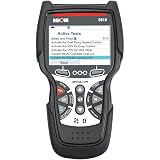
The 5610 is the handheld scanner I would consider when the NT604 Elite does not cover the task but I do not want a tablet. Its useful distinction is supported active tests and special functions in a cable-connected tool. It is not simply another code reader with a longer list of definitions: the question is whether its extra capabilities include your intended procedure.
Innova describes full-system scanning, bidirectional controls, and service functions, repeatedly qualifying availability by vehicle. The RepairSolutions2 companion app is optional; the scanner has its own diagnostic interface. Free updates are advertised. I would evaluate those documented terms rather than assume a recurring fee just because this is a more advanced tool.
Its manual separates ordinary diagnostic readings from system/actuator tests and special procedures. That matters when planning a purchase. An ABS code scan answers a different question from whether the tool can run the particular brake-service procedure required by the car.
Use the 5610 coverage checker to confirm the engine, transmission, module, and exact operation. “Will it work with my car?” is too broad. A planned software addition or gateway-support announcement should not be treated as a feature available today.
The selected bundle lists a protective boot, OBD2 and USB cables, soft pouch, and manual. I would choose it over the ArtiDiag900 Lite when a dedicated handheld suits my routine. For occasional engine-code lookups, I would choose a simpler reader. Bidirectional capability alone is not a promise of engine-control-unit (ECU) or key programming.
Reasons to Buy
- Supported active tests and special functions beyond code reading.
- Standalone handheld interface; companion app is optional.
- Free updates advertised and a model-specific coverage checker.
Reasons to Avoid
- Coverage must be checked by function, not just vehicle brand.
- More tool than an occasional engine-code lookup requires.
TOPDON ArtiDiag900 Lite — Wireless Tablet-Style Scanner

The ArtiDiag900 Lite is my tablet-style scanner choice for more involved diagnostic work. The wireless vehicle interface stays connected while the separate screen can be positioned where it is useful. That is a working-arrangement benefit, not proof of faster or more accurate diagnosis. It is most relevant when a larger display and confirmed service coverage solve a practical problem.
The ArtiDiag900 Lite manual specifies an eight-inch, 1280 × 800 display and 10,000 mAh battery. The package includes the VCI, power adapter, OBD2 extension, USB cable, carrying case, and guides. Unlike a phone dongle, it is another screen and kit to charge and store.
TOPDON’s U.S. page describes full-system diagnostics, bidirectional tests, and eight service categories, including oil reset, electronic parking-brake service, steering-angle reset, and ABS bleeding. Each remains vehicle-dependent. I would buy for a confirmed task rather than infer capability from the number of advertised brands or resets.
The update policy deserves particular attention: the current U.S. product page states free lifetime software updates, and the selected ArtiDiag900 Lite offer also advertises lifetime upgrades. I have not assigned an assumed annual renewal charge from older descriptions. Optional hardware and any separately required access services still need their own checks.
Battery analysis is a useful example of why bundle details matter: the manufacturer describes an optional BTMobile Pro accessory, not a battery tester included in this base kit. Check the extra equipment needed for your intended job. For a one-off check-engine inquiry, the AD310 remains the more focused type of purchase than a tablet and accessory kit.
Reasons to Buy
- Eight-inch display with a wireless vehicle interface.
- Supported full-system diagnostics, active tests, and service routines.
- Current U.S. policy advertises free lifetime updates.
Reasons to Avoid
- A separate tablet and VCI add charging and storage requirements.
- Optional battery-testing hardware is not included in the base kit.
How to Choose the Best OBD2 Scanner
Match diagnostic coverage to the fault code and vehicle systems
Start with the actual problem: a check-engine light, an airbag warning, or a planned maintenance procedure. An OBD-II scanner gives access to information, but the available information depends on the tool and vehicle. Reading a diagnostic trouble code (DTC), often called a fault code or error code, is the beginning of an investigation—not confirmation of which part to replace.
A generic OBD-II code uses a standardized definition, while manufacturer-specific codes need the appropriate vehicle context. That distinction is not identical to engine-only versus all-system access. The AD310 manual describes generic and manufacturer-specific codes, yet that does not make this basic reader an ABS or airbag tool. OBDLink’s explanation of standard and enhanced diagnostics shows why additional modules and data require separate coverage checks.
Consider an illustrative mistake: buying an engine-only reader for an airbag warning, seeing no engine codes, and concluding there is no fault. The tool has not answered the original question. Buy access to the relevant system first; then check whether you need only readings or a supported service procedure.
Check vehicle compatibility: makes and models, modules, and functions
A compatibility headline is only the first check. Match the exact scanner version to the model year, make, model, engine, and original sales market. For enhanced diagnostics, confirm the module. For service work, confirm the named procedure and any software, adapter, account, or gateway-access requirement. Do not assume all modern cars expose the same functions through the same tool.
Use BlueDriver’s Pro checker, Innova’s 5610 checker, or the selected brand’s coverage resource. If the result is unclear, ask support with the VIN and precise job: “Does this exact scanner support the required ABS bleeding procedure on this vehicle, and is additional paid access needed?” That is more useful than asking only whether the scanner works with your car.
Check three things before buying: the vehicle, the module, and the operation. A general compatibility badge or a review from another model year does not confirm all three.
Bluetooth OBD2 scanner vs. handheld scanner: choose for ease of use
A wired handheld scanner makes sense when you want a dedicated display and controls without using a smartphone. A phone-based tool lets you work on a device you already carry. A diagnostic tablet provides a separate screen again, but also adds charging and storage. These are usability trade-offs, not a ranking of diagnostic accuracy.
Among the Bluetooth OBD-II scanners here, BlueDriver offers a matched sensor/app experience; MX+ offers broader software choice. Decide whether you want one guided environment or have a verified app requirement. The best Bluetooth option for you depends on that answer, not the connection alone. For more involved work, compare the Innova’s handheld interface with the ArtiDiag900 Lite’s wireless tablet after confirming the procedure.
Check software costs and subscription terms before upgrading
Separate hardware, included software, optional apps, vehicle-specific access, and optional accessories. “No subscription” does not mean every third-party licence or extra battery tester is supplied. Conversely, expensive scanners should not be assigned an annual fee simply because similar tools use one. Pay attention to what the exact offer includes rather than the price category.
BlueDriver markets its matched app without a subscription; MX+ includes its own software while other applications have separate terms. Innova advertises free updates, and the current ArtiDiag900 Lite U.S. page advertises lifetime updates. Compare the region and package with the current policy. An old review may describe different terms; an optional feature is not automatically part of the base purchase.
Use live data and repair reports to guide the next check
Live data shows changing values; freeze frame preserves conditions associated with a recorded event. Engine speed, for example, is a reading that can help place the event in context, not a diagnosis by itself. OBDLink’s diagnostics guide distinguishes current readings, freeze-frame data, and saved reports. Available parameters still depend on the car and software.
Ask whether you need to view, save, graph, or share the readings. For planned logging, the MX+ software’s CSV export is a concrete feature to compare. BlueDriver’s repair reports offer a different kind of help: possible causes and further checks. Neither replaces diagnosis, but either can help you discuss car problems with a mechanic rather than arrive with only a cleared warning light.
Know when car diagnostic tools are not enough
A scan tool does not replace the vehicle’s service procedure, mechanical tools, or electrical testing. A displayed supply voltage is not the same as charging a battery or measuring its usable capacity. Buy for the work you can safely perform; handing useful findings to a professional mechanic can be a worthwhile outcome without attempting the repair yourself.
My automotive battery charger comparison covers a different job: charging and maintenance. Do not assume an ordinary charger is an approved programming power supply. Where a diagnostic or service operation needs voltage support, follow the vehicle and equipment instructions rather than improvise.
Using an OBD-II Scanner: Before You Clear a Fault Code
Connect according to the instructions. The car’s OBD2 port is the diagnostic connector, usually near the driver’s side of the dashboard; consult the vehicle handbook if it is not obvious. The AD310 instructions specify connecting with the ignition off, then switching it on for diagnostics. Follow your device’s sequence rather than assuming every tool connects identically. With a Bluetooth adapter, use the supported app and its setup instructions.
Record first. Before clearing anything, save the code, the reporting module, its status, and useful freeze-frame or live data. Note the symptom and when it occurs. A clear record gives you or a mechanic a starting point; erasing information immediately can make the next diagnostic step harder.
Do not confuse clearing with fixing. The AD310 manual explains that erasing codes can remove associated information and reset readiness. A cleared lamp is not evidence that the fault has been repaired or that the vehicle is ready for an emissions inspection.
Permanent codes are different. The California Bureau of Automotive Repair explains that permanent DTCs cannot simply be erased with a scanner or battery disconnection. The vehicle must verify that the relevant problem has been corrected. Buying a more expensive scanner is not a way around that distinction.
Keep testing safe. Follow the exact scanner and vehicle instructions, do not operate a scanner while driving, and provide proper ventilation when the engine must run. Active tests can command vehicle components, so they are not harmless demonstration buttons. Brake, restraint-system, and other safety-critical procedures belong with someone equipped and qualified to perform them.
OBD2 Scanner FAQs
Is a basic OBD-II scanner enough for a check-engine light?
It can be enough to retrieve the initial engine/emissions code and supporting data on a compatible vehicle. The AD310 is my narrow-task option here. Further diagnosis may require other tools or professional help; the code is a starting point, not a guaranteed shopping list of replacement parts.
Does “all systems” mean every function on every car?
No. Module access, live-data availability, active tests, and service procedures are separate questions. Check the exact vehicle and operation with the manufacturer. This matters especially when the purchase is intended for one specific repair rather than general code reading.
Can these scanners turn off an ABS or airbag warning?
Some can read and clear supported ABS/SRS codes, but that does not establish that the underlying fault is corrected or that the system is safe. The NT604 Elite’s diagnostic access, for example, is not an ABS-bleeding feature. Do not buy a scanner solely to suppress a safety warning.
Which Bluetooth OBD2 scanner suits me: BlueDriver or OBDLink MX+?
I would choose BlueDriver for a dedicated app and repair-report approach, provided original Pro coverage suits the car. I would choose MX+ for a verified compatible app, dashboard, or logging requirement. These Bluetooth scanners do not gain each other’s software features simply because both connect wirelessly.
Does the ArtiDiag900 Lite need a paid annual update?
The current U.S. product page states free lifetime updates. That is the policy used here, not an assumed renewal charge from an older description. Check the exact region and seller’s terms; optional equipment and separately required access services remain separate purchases.
Can I use one of these to program keys or replace an ECU?
Do not infer those capabilities from code clearing, an oil reset, or bidirectional testing. I have not selected these configurations as key-programming or ECU-flashing solutions. Anyone buying for such a job should verify the exact operation, supported vehicle, required equipment, and authorization separately.
Will these work on a diesel, hybrid, imported car, or EV?
Do not assume one universal answer. This comparison is centered on U.S.-market owner/DIY diagnostic use, and a generic compatibility statement does not resolve fuel type, original market, newer protocols, or enhanced systems. Confirm the exact vehicle and function; do not extend emissions-reader coverage to all electric-vehicle modules.
Final Verdict: Which OBD-II Scanner Should You Choose?
My first decision would be diagnostic access, then convenience. For an initial engine fault code and supporting data, the ANCEL AD310 is the focused choice. The FOXWELL NT604 Elite is the next comparison for its documented four-system role—but not when a service routine, rather than reading codes, is the actual requirement.
For phone-based diagnosis, BlueDriver Pro LSB2 suits a matched app/report experience, while OBDLink MX+ suits a specific compatible-software plan. For supported active tests, compare the Innova 5610 with the TOPDON ArtiDiag900 Lite. Decide between the handheld and wireless-tablet format only after checking the operation you need.
The best value is the least complicated tool that covers your confirmed needs, not the one promising the most fixes. Keep the exact model, vehicle coverage, and software costs together when comparing OBD-II scanners. A longer feature list is useful only when its extra functions address work you will actually do.
Sources and Product Documents
Reviewed October 2, 2026. Product selection began with an Amazon candidate export; capabilities below were researched separately. Manufacturer specifications and seller bundle details are not independent performance tests. Compatibility checkers require the buyer’s vehicle information.
- ANCEL AD310: product overview, ANCEL Technology product entry, manufacturer-authored user manual, and selected listing and contents. The comparison does not import an active EVAP test or unconfirmed USB accessory.
- FOXWELL NT604 Elite: manufacturer product entry (indexed description), selected listing, limitations, and bundle, and sales-page feature and update descriptions. The NT604 is not assigned service functions from related NT614/NT624 products.
- BlueDriver Pro LSB2: exact LSB2 listing, original Pro product page, Pro compatibility checker, and developer’s app description. Next-Gen is a separate product.
- OBDLink MX+: adapter specifications, included software, mobile-app features, compatible third-party applications, enhanced-coverage guidance, and selected package.
- Innova 5610: features, update policy, and FAQ, model-specific coverage checker, manufacturer feature overview, user manual, and selected kit. Older gateway-support forecasts are not treated as confirmation of current access.
- TOPDON ArtiDiag900 Lite: current U.S. product page and update policy, manual, hardware, and package contents, and selected AD900 Lite listing. Optional BTMobile Pro hardware is not included in the base-kit comparison.
- Code clearing and readiness: California Bureau of Automotive Repair OBD Test Reference, plus the ANCEL and TOPDON operating precautions. This guide does not promise an inspection result or provide a vehicle-specific repair procedure.
- Diagnostic terminology and data: OBDLink’s standard versus enhanced diagnostics explanation and diagnostics guide, with the AD310 manual’s code and connector sections. These clarify terminology; they do not extend a selected scanner’s vehicle coverage.